How to Prevent Duplicate Payments with AI Automation
Table of Contents
- What Is Duplicate Payment Detection?
- How Much Do Duplicate Payments Actually Cost?
- Why Doesn’t Your ERP Already Catch These?
- How Does AI Duplicate Payment Detection Work?
- Why Not Send Every Invoice to the AI?
- What Makes the AI Agent Different from a Rule-Based Check?
- What Does a Duplicate Alert Look Like?
- Where Does This Fit in Your AP Workflow?
- How Do You Know If Duplicate Payments Are a Problem for You?
- What Should You Do Next?
What Is Duplicate Payment Detection?
Duplicate payment detection is the process of identifying and stopping invoices that would pay for the same goods or services twice. It sounds straightforward, but the duplicates that cost businesses real money are the ones where the invoice numbers, dates, and descriptions all look different on the surface, even though they reference the same work.
How Much Do Duplicate Payments Actually Cost?
APQC’s benchmarking data puts the median duplicate payment rate at 1.5% of total disbursements. Bottom-performing companies hit 2% or higher, and even top performers still lose around 0.8%. Most of this wasteful spend hides inside AP until an audit surfaces it months later.
SAP Concur’s analysis of SMB invoice data found that a typical small business processing around 450 invoices per month flags roughly 6 duplicate invoices each month, with an average duplicate value of $2,034. If all of those slip through, that is $12,000 per month walking out the door.
Duplicate Payment Exposure by AP Volume
| Annual AP Spend | At 1% Rate | At 2% Rate |
|---|---|---|
| $2 million | $20,000/yr | $40,000/yr |
| $5 million | $50,000/yr | $100,000/yr |
| $10 million | $100,000/yr | $200,000/yr |
| $20 million | $200,000/yr | $400,000/yr |
These are not one-time losses. They recur every year until the root cause is fixed. And the recovery process is painful: your AP team has to identify the overpayment, contact the vendor, request a credit or refund, track the repayment, and reconcile the books. That recovery effort typically takes 2 to 4 hours per incident.
Why Doesn’t Your ERP Already Catch These?
It does catch some of them. Mid-market ERPs like NetSuite, Dynamics 365, SAP Business One, Acumatica, and Sage Intacct all have built-in duplicate detection. The standard check is simple: same vendor + same invoice number = flag it.
That check works when a vendor submits the identical invoice twice. But the expensive duplicates happen differently. A vendor submits an invoice in February, does not see payment by mid-March, and resubmits with a new invoice number, slightly different line-item descriptions, and maybe a different date. Your ERP sees two invoices from the same vendor with different invoice numbers and treats them as separate payables.
Here is what that looks like in practice:
Two Invoices, Same Work
| Field | Original Invoice (Feb) | Resubmitted Invoice (Mar) |
|---|---|---|
| Invoice # | INV-2026-0847 | APX-03152026 |
| Amount | $14,200 | $14,200 |
| Description | Strategic advisory services, phase 2 | Strategy consulting, phase 2 |
| PO Reference | PO-4401 | PO-4401 |
| Date | Feb 28, 2026 | Mar 15, 2026 |
A database query comparing invoice numbers will not connect these two. The numbers are completely different. The descriptions use different wording for the same engagement. A human reviewing both invoices side by side would spot it instantly, but when they arrive weeks apart and land on different screens in your ERP, nobody is comparing them.
This is the gap. Your ERP handles exact-match duplicates. The fuzzy matches, where the same work shows up under different invoice numbers and different wording, require something that can actually read and interpret the content.
How Does AI Duplicate Payment Detection Work?
The detection workflow runs after an invoice is entered into your ERP but before it is approved for payment. If your system has a staging area before entry, you can catch duplicates even earlier. The logic works the same either way.
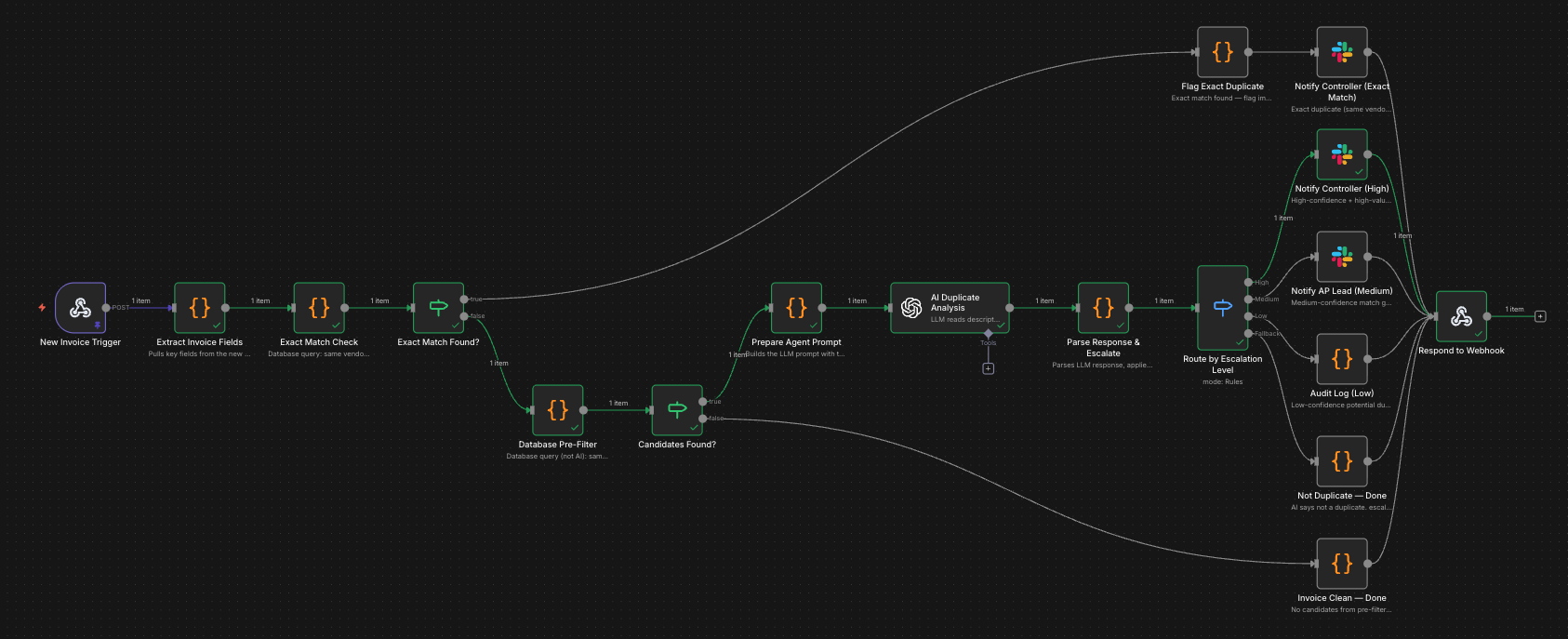
The Detection Workflow
- 1
Extract key fields from the new invoice
The workflow pulls vendor ID, invoice number, amount, date, and line-item descriptions from the newly entered invoice.
- 2
Run an exact-match check
A database query searches your ERP for any existing invoice from the same vendor with the same invoice number. If it finds one, the invoice is flagged immediately and the workflow stops. No AI needed for this step.
- 3
Run a database pre-filter
If no exact match exists, a query pulls any invoices or payments from the same vendor in the last 90 days where the amount falls within a configurable threshold (for example, within 5%). This is a fast database query, not an AI call. Most invoices return zero candidates and the workflow ends here.
- 4
Send candidates to the AI agent
When the pre-filter returns candidates, the new invoice and the candidate invoices are sent to an AI agent. The agent reads the line-item descriptions on both invoices and determines whether they describe the same work or goods.
- 5
Check PO references and balances
The agent cross-references purchase order numbers. If both invoices reference the same PO, that is a strong duplicate signal. If that PO has a zero remaining balance (already fully invoiced), the signal is even stronger.
- 6
Route based on confidence and amount
The agent returns a confidence score with its reasoning. High-confidence matches on invoices above a dollar threshold go to the controller and AP specialist. Medium-confidence matches go to the AP specialist alone. Both invoices appear side by side with the agent's reasoning attached.
Why Not Send Every Invoice to the AI?
Two reasons. First, a database query takes milliseconds and costs nothing. An AI call takes seconds and has a per-call cost. Second, most invoices have no duplicates at all. The pre-filter step screens out the vast majority of invoices before AI is involved, so you only pay for AI calls when there is genuinely something ambiguous to interpret.
This is the same layered approach used in automated invoice processing: let fast, cheap tools handle the obvious cases and bring in AI only where its judgment adds value.
What Makes the AI Agent Different from a Rule-Based Check?
A rule-based system compares strings. “Strategic advisory services” and “Strategy consulting” are different strings, so a rule-based check sees two distinct invoices.
An AI agent reads both descriptions and recognizes that they reference the same type of engagement. It evaluates the combination of matching vendor, similar amount, overlapping date range, matching PO reference, and semantically similar descriptions. It weighs these signals together and produces a confidence score, not just a binary match/no-match.
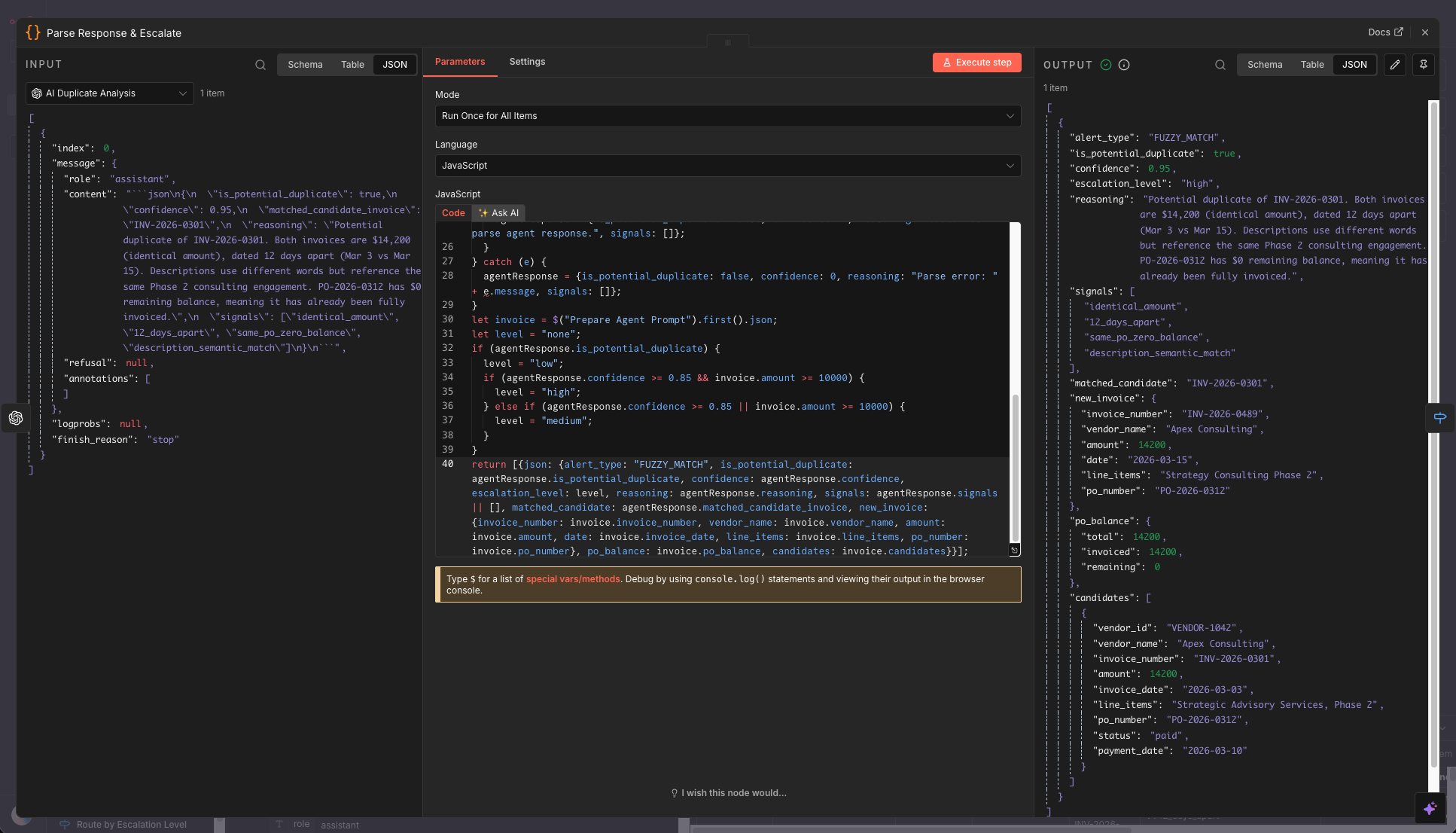
That is the difference between catching duplicates that look identical and catching duplicates that look different on paper but describe the same work.
What Does a Duplicate Alert Look Like?
When the agent flags a potential duplicate, the notification includes everything your AP team needs to make a quick decision: both invoices displayed side by side, the agent’s confidence score, and the specific reasoning behind the flag.
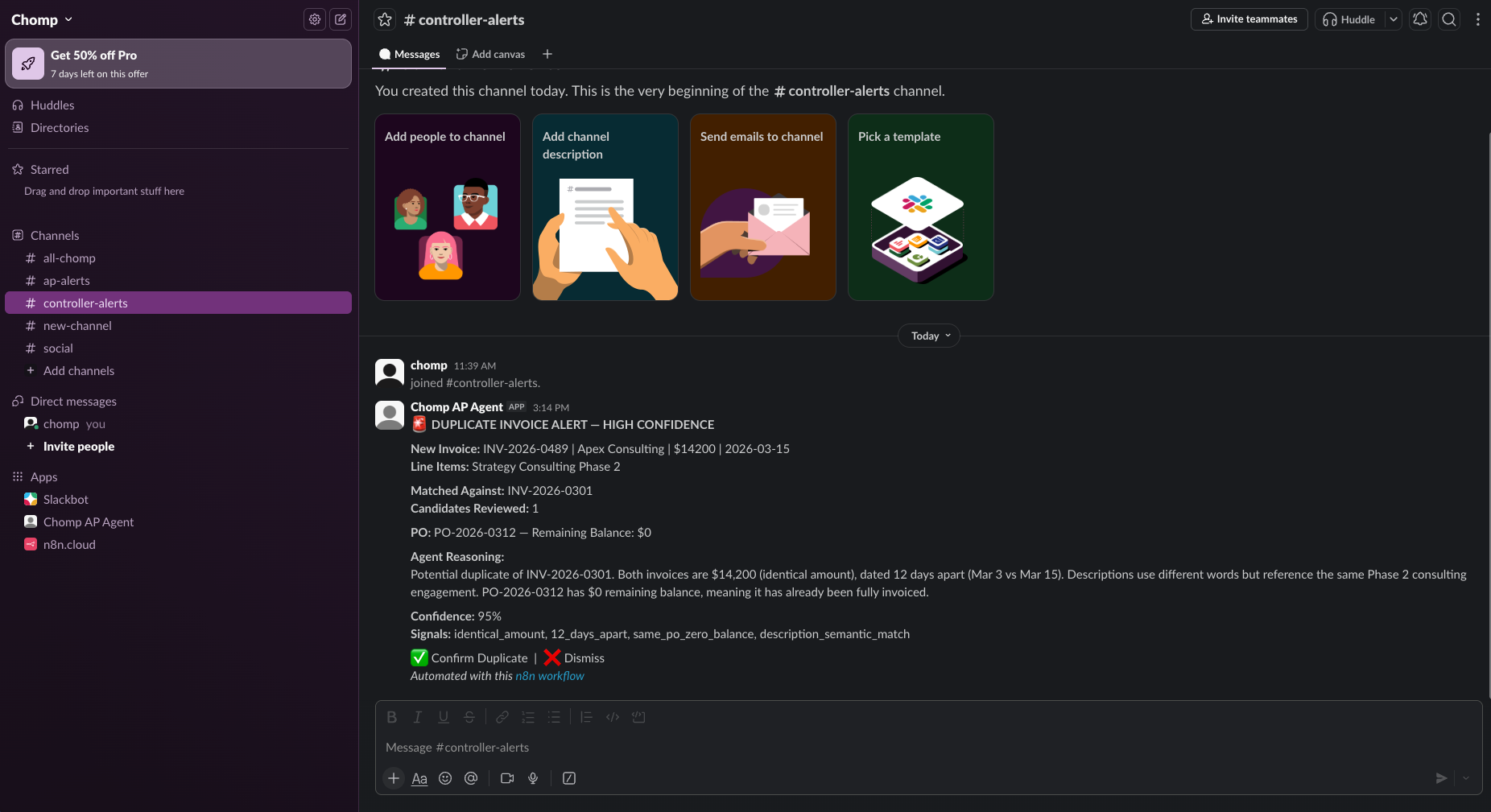
The escalation routing is configurable. A typical setup looks like this:
- High confidence (above 85%) + amount over $10,000: Alert goes to the controller and the AP specialist
- Medium confidence (60-85%) or amount under $10,000: Alert goes to the AP specialist only
- Low confidence (below 60%): Logged for audit trail, no immediate alert
The goal is to give your team a clear recommendation with enough context to confirm or dismiss it in under a minute. No digging through your ERP to find the original invoice, no manual comparison of line items. The agent already did that work.
If you are getting too many false positives, you can widen the amount tolerance, shorten the lookback window, or raise the confidence threshold. If you want tighter controls, narrow those same parameters. The cost of building this type of automation is small relative to what it prevents.
Where Does This Fit in Your AP Workflow?
Duplicate detection is one piece of a broader accounts payable automation strategy. It sits between invoice entry and payment approval, which means it works alongside whatever you already have in place.
You do not need to replace your ERP, change your approval chains, or retrain your team on new software. The detection workflow connects to your existing system through APIs, reads invoice data that is already there, and sends alerts through channels your team already uses (Slack, email, or Teams).
If you have already automated invoice data entry with AI or set up AI-powered invoice processing, adding duplicate detection is a natural next layer. The same data extraction that feeds invoices into your ERP also feeds the duplicate detection workflow. Once duplicates are caught, the next step is automated invoice approval routing to get each invoice to the right approver based on safe limits and delegation of authority rules.
For companies earlier in their automation journey, understanding what AI automation is and how it works provides useful context for how these systems connect to your existing tools.
How Do You Know If Duplicate Payments Are a Problem for You?
You might not know until your next audit, which is the whole issue. But there are reliable indicators that suggest your AP process is exposed.
Signs your business is at risk for duplicate payments
- Vendors regularly resubmit invoices because they haven't seen payment yet
- Your AP team processes invoices from multiple channels (email, mail, vendor portals)
- You have more than one person entering invoices into your ERP
- Invoice volume has grown but your review process hasn't changed
- Your last audit found duplicate or erroneous payments
- You rely on manual spot-checks rather than systematic duplicate screening
If three or more of those apply, the math from the APQC benchmarks suggests you are likely losing 1-2% of your AP spend to duplicates right now. At $20 million in annual payables, the APQC benchmarks translate to $200,000 to $400,000 per year in preventable losses, plus the staff time spent chasing refunds after the fact.
The signs you are ready for AI automation extend well beyond AP. But duplicate payments are one of the clearest places where the ROI is immediate and measurable.
What Should You Do Next?
Duplicate payment detection is not a problem you solve with a better spreadsheet or more careful manual review. As invoice volume grows, manual cross-referencing breaks down. The duplicates that slip through are the ones that look different enough to fool a quick glance.
AI-powered detection fills the gap between what your ERP’s exact-match checks can catch and the fuzzy duplicates that only surface during audits. It layers on top of your existing systems, runs automatically on every invoice, and puts the decision in front of your AP team with full context before any money moves.
Chomp Automation is based in Tampa, FL and works with businesses across the country. Download the free workflow to see the full detection logic, or book a free call if you want it built and customized for your team.
About the Author

Chad H.
(opens in new tab)Founder of Chomp Automation. Engineer with enterprise AI experience at Microsoft who builds automation systems for businesses growing faster than their systems can handle.