Automate Invoice Approval Routing with Safe Limits and Low-Risk Auto-Approval
Table of Contents
- What Is Invoice Approval Routing?
- What Does Manual Invoice Routing Cost Your AP Team?
- How Does the Automated Approval Routing Workflow Work?
- What Are Safe Limits and Approval Tiers?
- How Does the Workflow Handle Edge Cases?
- What Happens with Real Invoices? Four Demo Scenarios
- Scenario A: Auto-Approve ($175, Known Vendor)
- Scenario B: Manager Routing ($2,500, Known Preferred Vendor)
- Scenario C: AI Classification + Director Routing ($18,000, New Vendor)
- Scenario D: CFO Escalation ($35,000, New Vendor)
- What Is the ROI on Automating Invoice Approval Routing?
- Where Does Invoice Approval Routing Fit in Your AP Stack?
- Is Your Team Ready for Automated Approval Routing?
- What Should You Do Next?
What Is Invoice Approval Routing?
Invoice approval routing is the process of sending each invoice to the person authorized to approve it based on the dollar amount, department, and vendor relationship. Most finance teams manage this through a delegation of authority matrix that maps each approver to their safe limit, the maximum dollar amount they are allowed to approve. The problem is that applying those rules manually takes time, introduces errors, and creates delays that cascade into late fees and missed discounts. For routine, low-risk invoices from known vendors, the manual process is especially wasteful because the answer is almost always “approve.” Those invoices should flow through automatically, with the AP team notified for spot-checking.
This article walks through the invoice approval routing workflow I built and demoed in the video above. If you are looking for the earlier steps in the AP automation pipeline, start with how to automate invoice data entry with AI or the duplicate payment detection walkthrough.
What Does Manual Invoice Routing Cost Your AP Team?
Every invoice that hits your AP inbox needs someone to read it, figure out which department it belongs to, look up who has approval authority for that amount, confirm that person is available, assemble the relevant context, and send it over. According to AP processing benchmarks, the average invoice takes about 12 minutes of total manual touch time. The routing and triage portion alone runs 5 to 8 minutes before an approver even sees the invoice.
Those missed discounts are expensive. A standard 2/10 net 30 discount gives you 2% off if you pay within 10 days. Skipping that discount is the equivalent of a 36.7% annualized interest rate for holding onto cash 20 extra days. And 79 to 85% of eligible early payment discounts go uncaptured because invoices take too long to process and approve.
The fix is not adding more people to the AP team. It is automating the routing step so every invoice lands on the right desk in seconds, with all the context the approver needs to make a fast decision.
How Does the Automated Approval Routing Workflow Work?
The workflow I built in n8n handles the full routing pipeline: receive an invoice, look up the vendor, identify the department, apply the approval matrix, check if the approver is available, and route to the correct person in Slack. Here is the step-by-step breakdown.
The Approval Routing Pipeline
- 1
Invoice arrives via webhook
When a new invoice is created in your system, the details are sent to a webhook URL. This triggers the workflow automatically.
- 2
Vendor history lookup
The workflow matches the vendor name against your vendor master list using fuzzy matching. If found, it pulls the vendor's tier (standard or preferred), invoice count from the last 12 months, and average invoice amount. This context helps approvers make faster decisions.
- 3
Department resolution
The workflow checks the GL code first. If GL code 6100 maps to Operations, the department is resolved. If there is no GL code, it checks the cost center prefix. If both are empty, the invoice is flagged for AI classification.
- 4
AI classification (when needed)
For invoices with no GL code or cost center, the workflow sends the vendor name, amount, and line items to an LLM. The AI classifies the invoice into the correct department based on its contents.
- 5
Approval matrix lookup
With a department and amount, the workflow checks the approval matrix. This table maps each department and dollar range to the right approver, their safe limit, and a backup delegate.
- 6
Approver availability check
If the primary approver is marked out of office on their calendar, the workflow automatically routes to the backup delegate. No manual coordination required.
- 7
Routing and notification
The workflow assembles a Slack message with the invoice details, vendor history, and approval buttons, then sends it to the appropriate channel. Auto-approved invoices go to #ap-alerts. Everything else goes to #ap-routing.
- 8
Audit logging
Every routing decision is logged with the routing ID, approver, rule that fired, department source, and timestamp. Your auditors get a complete trail.
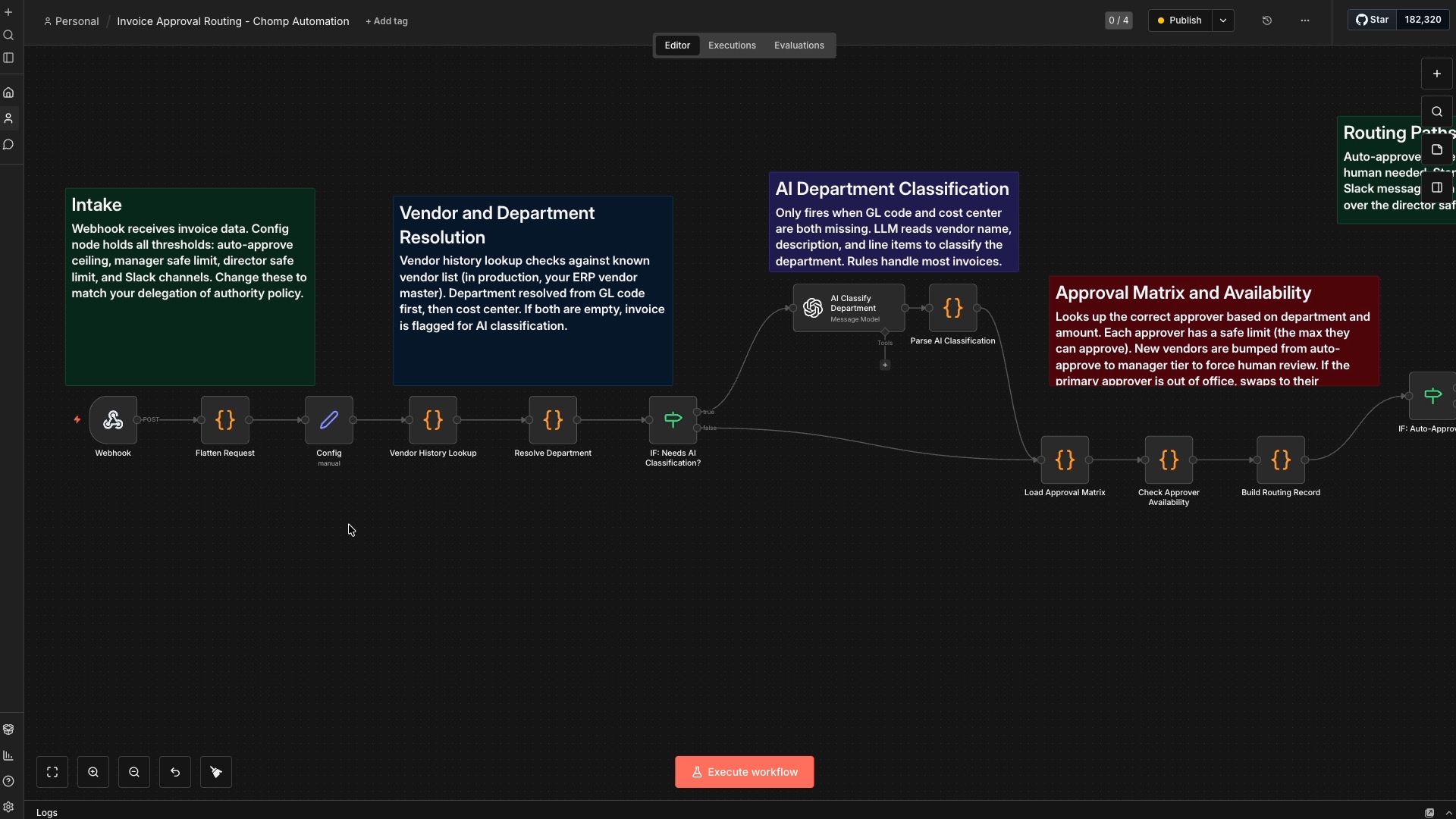
The entire workflow runs in under 10 seconds per invoice. Compare that to the 5 to 8 minutes of manual triage, and you can see why this is one of the highest-impact automations in the AP space.
What Are Safe Limits and Approval Tiers?
Safe limits, also called approval thresholds, define how much each person in your organization is authorized to approve. This is standard delegation of authority. The workflow applies four tiers:
Approval Tier Structure
| Tier | Amount Range | Who Approves | Example |
|---|---|---|---|
| Auto-Approve | Under $500 | SYSTEM (no human needed) | $175 office supplies from a known vendor |
| Manager | $500 to $5,000 | Department Manager | $2,500 marketing supplies |
| Director | $5,000 to $25,000 | Department Director | $18,000 manufacturing equipment |
| CFO | Above $25,000 | CFO | $35,000 consulting engagement |
These tiers are fully configurable. The dollar thresholds, the approvers, and the department mappings all live in a config node that you can adjust to match your organization’s delegation of authority rules.
How Does the Workflow Handle Edge Cases?
Three common scenarios trip up manual routing processes. The workflow handles all three automatically.
New vendor override. If a vendor is not in your vendor master list, the invoice always requires human review regardless of the amount. A $50 invoice from an unknown vendor will not get auto-approved. This protects against fraud and ensures new vendor relationships get proper oversight.
Out-of-office delegation. If the primary approver is on vacation or planned leave, the workflow checks their calendar status and routes to the designated backup. Consider a Tampa distribution company where the Marketing Director, S. Kim, is out for two weeks. Any invoice that would normally go to Kim automatically routes to R. Davis, the Marketing Manager, instead. No emails, no Slack messages asking “who should I send this to?”, no delays.
Missing department codes. When an invoice has no GL code and no cost center, rule-based systems stall. This workflow sends those invoices to an AI agent that classifies the department based on the vendor name, amount, and line item descriptions. About 10 to 15% of invoices in a typical AP operation fall into this category. The AI fills the gap so the routing continues without human intervention.
What Happens with Real Invoices? Four Demo Scenarios
The video demonstrates four invoices that exercise every routing path. Here is what happened with each one.
Scenario A: Auto-Approve ($175, Known Vendor)
Invoice: INV-2026-0092 from Coastal Office Products for $175.00. GL code 6100.
The GL code maps to Operations. Coastal Office Products is a known vendor with 6 invoices in the last 12 months and an average of $450. At $175, the amount falls well under the $500 auto-approve ceiling, so the workflow marks it as auto-approved. The approver is SYSTEM. A notification goes to #ap-alerts for the AP team to spot-check after the fact.
No human touched this invoice. Total processing time: seconds.
Scenario B: Manager Routing ($2,500, Known Preferred Vendor)
Invoice: INV-2026-0415 from Meridian Supply Co for $2,500.00. Cost center MKT-100.
The cost center prefix MKT maps to Marketing. Meridian is a known preferred vendor with 12 invoices in the last year, averaging $2,200. The $2,500 amount falls in the manager tier ($500 to $5,000), so the workflow routes to R. Davis, Marketing Manager, who has a $5,000 safe limit. The approval request lands in #ap-routing with the invoice details, vendor history, and Approve/Reject buttons.
Scenario C: AI Classification + Director Routing ($18,000, New Vendor)
Invoice: INV-2026-0831 from Apex Industrial Equipment for $18,000.00. No GL code, no cost center. This vendor is not in the vendor master list.
Since both department codes are empty, the workflow sends the invoice to the AI classification step. Based on the vendor name and line items, the AI classifies this as Manufacturing. The $18,000 amount falls in the director tier ($5,000 to $25,000), routing to L. Pham, Manufacturing Director, with a $25,000 safe limit. Because Apex is a new vendor, the Slack message includes a new vendor warning, giving L. Pham an extra signal to review carefully.
Scenario D: CFO Escalation ($35,000, New Vendor)
Invoice: INV-2026-0944 from Stratton Consulting Group for $35,000.00. Cost center ENG-200.
The cost center maps to Manufacturing. Stratton is a new vendor. At $35,000, this exceeds the $25,000 director safe limit and escalates to CFO review. The invoice is stamped as pending CFO review and routed to #ap-routing with the full context, vendor warning, and escalation flag.
What Is the ROI on Automating Invoice Approval Routing?
The math comes straight from the workflow demo. For a company processing 500 invoices per month:
In the manual process, every invoice requires someone to read it, identify the department, look up who has authority, confirm availability, compile the context, and send it over. That is 5 to 8 minutes per invoice before an approver even sees it. Then the approver has to pull up the vendor record, check the budget, and review the history. That is another 5 to 10 minutes.
With the automated workflow, invoices that qualify for auto-approval skip that entire process. At 500 invoices per month, roughly 20 to 30% are routine, low-risk invoices from known vendors that get auto-approved. For the rest, the routing is instant and the Slack message includes all the context the approver needs, reducing their review time to under a minute.
Manual vs Automated Approval Routing (500 invoices/month)
| Step | Manual Time | Automated |
|---|---|---|
| Routing and triage | 5-8 min per invoice | Instant (automated) |
| Approver review | 5-10 min per invoice | Under 1 min (context pre-assembled) |
| Auto-approved invoices | Same manual process | 0 min (20-30% of volume) |
| Total per invoice | 10-18 min | Under 1 min or 0 min |
Where Does Invoice Approval Routing Fit in Your AP Stack?
Approval routing is one layer in a broader accounts payable automation pipeline. It sits between invoice data entry (getting the invoice into your system) and invoice approval (the actual approve/reject decision). Here is how the pieces connect:
- Invoice data entry: AI extracts invoice data from PDFs, scans, and emails. That is the workflow covered in automate invoice data entry with AI.
- Duplicate detection: Before an invoice is approved, it gets checked against existing invoices and POs. That is the duplicate payment detection workflow.
- Approval routing (this workflow): The invoice lands on the right approver’s desk with full context.
- Approval decision (next video): The approver acts on the Slack message with one click, and the workflow records the decision with a full audit trail.
You do not need all four layers to start. Each workflow runs independently and connects to your existing ERP or accounting system through APIs. Your QuickBooks, NetSuite, Sage, or Xero setup stays exactly as it is. For a broader look at how these automations fit together, see how to automate invoice processing.
This kind of workflow falls squarely into the back-office automation work where Chomp Automation focuses. The process is repetitive, the rules are well-defined, and the savings are immediate.
Is Your Team Ready for Automated Approval Routing?
If any of these sound familiar, automated invoice approval routing would make an immediate difference:
Signs you need automated approval routing
- Your AP team manually triages every invoice to figure out who should approve it
- Invoices regularly go to the wrong approver and need to be rerouted
- Approvals stall when someone is on vacation because nobody knows who the backup is
- You have a delegation of authority matrix, but it lives in a spreadsheet nobody references
- Invoice volume is growing and your routing process has not scaled with it
- Late fees or missed early payment discounts show up on your AP aging report
What Should You Do Next?
The free workflow and approval matrix template are available at the link in the video description. The template includes the safe limit tiers, department-to-approver mapping, auto-approve rules, and delegation chains so you can map your own approval structure before building anything.
If you want to see how the invoices get into your system in the first place, watch the automated invoice data entry walkthrough. To learn how AI catches duplicate payments before money goes out the door, see the duplicate payment detection demo.
Chomp Automation is based in Tampa, FL and builds invoice automation for businesses across the country. Book a free call if you want this workflow built and customized for your team.
About the Author

Chad H.
(opens in new tab)Founder of Chomp Automation. Engineer with enterprise AI experience at Microsoft who builds automation systems for businesses growing faster than their systems can handle.